
Changelog

New releases and improvements to ViddyScribe Enterprise.

Latest release

Caption preview and other improvements

  • Preview captions on the video, in full sentences
  • Speech updates itself after a pronunciation change
  • Upload progress with speed and time left
  • Faster Library and exports
  • Usage in Settings and full names on hover

All-new Captions Editor

  • Edit, delete, or modify captions and the speaker labels
  • Optimized for speed
  • Multiple format options for exporting

Audio description in 20 more languages

You can now write and narrate audio description in 20 more languages, for 98 in total. Pick one when you create audio description, or add it to a video you have already described. New languages are marked in the language picker the first time you open it.

New languages

  • Arabic (Egypt)
  • Assamese (India)
  • Bosnian (Bosnia and Herzegovina)
  • Chichewa (Malawi)
  • Dari (Afghanistan)
  • Hausa (Nigeria)
  • Igbo (Nigeria)
  • Javanese (Indonesia)
  • Kazakh (Kazakhstan)
  • Khmer (Cambodia)
  • Kyrgyz (Kyrgyzstan)
  • Maltese (Malta)
  • Mandarin Chinese (Taiwan)
  • Manipuri (Meitei, India)
  • Sesotho (South Africa)
  • Sindhi (India)
  • Somali (Somalia)
  • Tajik (Tajikistan)
  • Uyghur (China)
  • Uzbek (Uzbekistan)

Meet your new enterprise workspace

ViddyScribe Enterprise has a new interface for creating, reviewing, and managing audio description. A more organized library, a more capable editor, and a shared workspace for your team.
LibraryEvery video, version and download in one place.
The new ViddyScribe Library listing three videos, with the Council meeting video open in a side panel that offers review and render actions and downloads for the AD script, captions and transcript
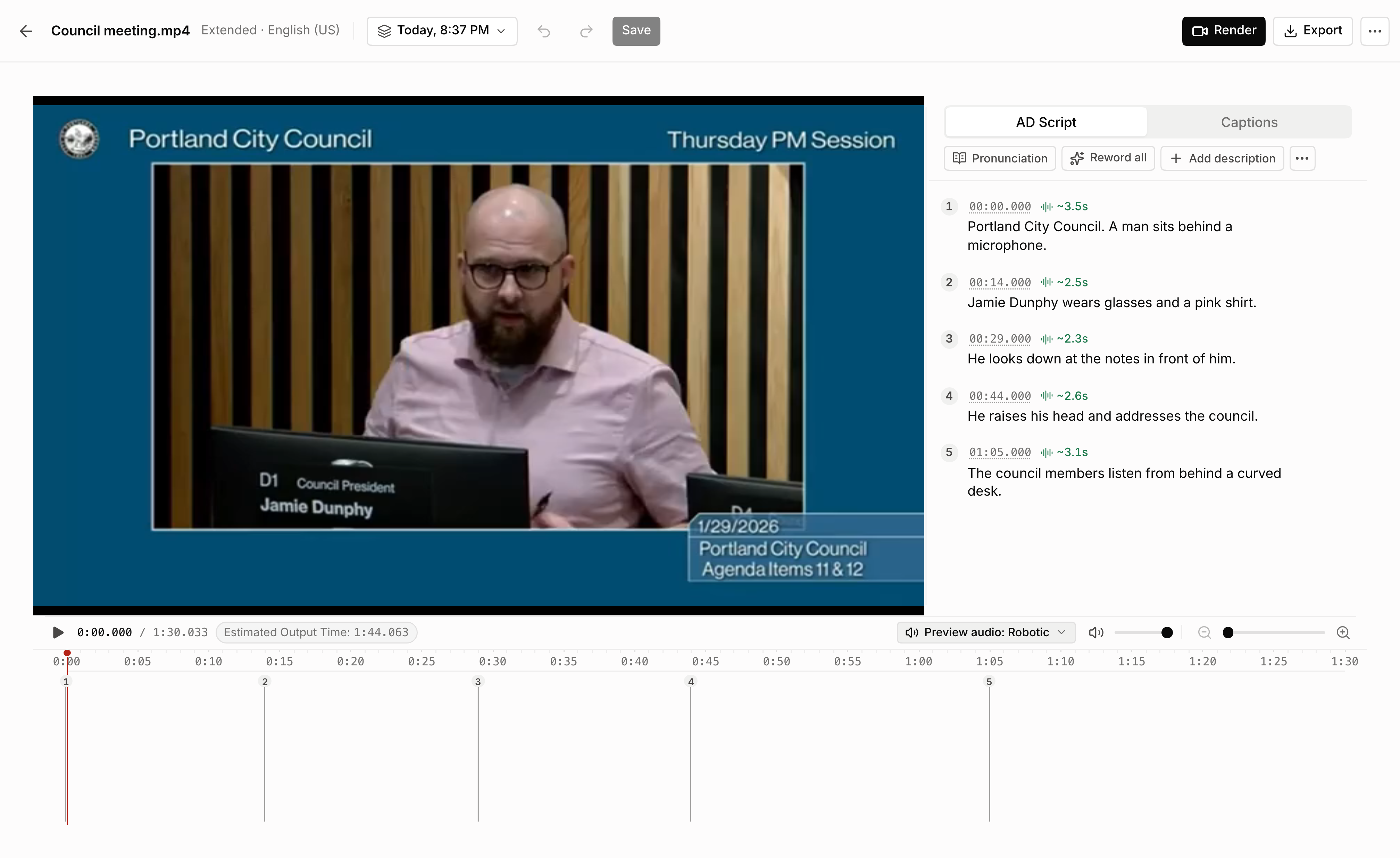
EditorVideo, script and timeline side by side.
The new ViddyScribe editor showing a city council video beside an editable audio description script, with timing controls on the timeline below

What’s changed

  • Review the script before the final output

    Check “Review script before rendering” when you create AD Video or AD Audio. ViddyScribe prepares the script and waits for you. Edit the text and timing, add missing descriptions, fix pronunciations, and listen in the selected voice. Then create the output from your reviewed script. The total price stays the same.

  • A library built around your work

    Organize videos into folders and keep scripts, audio, captions, and finished videos together. Search finds a video by its name, language, or AD type.

  • One place for every version of a video

    Standard AD, Extended AD, and every language sit under the same video. Switch between them from the video’s panel instead of hunting through a long list.

  • All your languages, ready to use

    Every supported language and regional variant is available when you create a generation, with 26 new options at launch, including Filipino, Malay, Persian, Icelandic, and Haitian Creole.

  • Video, script, and timeline in one view

    Review descriptions as the video plays. Edit the words, adjust the timing, and check how the narration fits before creating your final output.

  • Pronunciations you control

    Tell the voice how to say names and technical terms, for one video or across your whole library. Update the speech and listen again without rendering a new video.

  • Pick up where you left off

    Return to a saved working draft, let a teammate continue the review, and save versions when you reach a milestone.

  • Your team’s settings, ready to reuse

    Save generation settings as a preset for future videos. Keep it private or share it with your team so everyone can start with the same setup.
  • Seat management

    See how many seats your team is using, invite teammates, and manage roles from your team settings.

  • Faster everywhere

    The library, editor, and settings load faster, and moving between them feels close to instant.

  • Even more attention to accessibility

    Accessibility has always been part of ViddyScribe. The new workspace takes it further, with more care for keyboard use, screen reader labels, and clear focus states on every page.

Read the announcementTake a closer look at the new platform.